

Microsoft Copilot in Teams: Features, Capabilities, and Implementation
- Jun 20, 2025
- 7 min read

Microsoft Copilot in Teams, beyond serving as another digital assistant among business collaboration tools, stands apart because it delivers immediately applicable, hands-on enhancements that directly address the kinds of real-world, often unglamorous challenges that organizations and teams confront each day—challenges such as keeping track of multiple action items that may accumulate during consecutive meetings, managing and extracting meaning from sprawling or fragmented conversation threads, automating the production of communications or status updates that otherwise require considerable time, or enabling quick access to diverse and often distributed critical information located in emails, files, and chats, while also removing the burden of laborious manual searching or constant context-switching.
The platform empowers a project manager, for instance, to arrive late to a meeting and use Copilot to obtain a detailed summary of every essential discussion point and decision, which means avoiding disruptions or the awkwardness of requesting a personal recap from colleagues; at the same time, a sales team member benefits from Copilot’s capacity to scan and synthesize interactions found in Teams channels, Outlook threads, and SharePoint documents, thus producing a unified, context-rich briefing in a fraction of the time it would otherwise take to cross-reference multiple sources. Those responsible for recurring routines such as daily stand-ups or weekly team check-ins are able to schedule Copilot to generate summaries or draft reports automatically, so that repetitive manual work is minimized and valuable time is redirected toward more strategic, higher-value activities that have a direct impact on business results.
HOW TO USE IT:


How Copilot in Teams Works: From Data to Actionable Intelligence
To put it simply, though without simplifying the sophisticated engineering involved, each time a user interacts with Copilot in Teams—whether this takes the form of typing a prompt, clicking the Copilot icon, or invoking Copilot’s features during a meeting—the system launches a background process that assembles all relevant context from the user’s recent and historical activity, gathering messages from chats, transcripts from meetings, Outlook calendar entries, emails, and documents from both SharePoint and OneDrive, with all data access carefully governed by the user’s permissions and by organizational policies. This broad and detailed context package, paired with the user’s request, is transmitted securely through Microsoft Graph APIs to Microsoft’s Azure OpenAI service, where the GPT-4o language model processes the information; this model, because of its vast 128,000-token context window and its multimodal (text, speech, file) input capabilities, can analyze and generate language at a depth and quality that earlier solutions could not achieve.
When GPT-4o receives the prompt and context, it produces a synthesized response that draws on the full depth and complexity of the discussion or workflow, surfacing key topics, recognizing action items, and detecting decisions or follow-up points that may be embedded within lengthy or loosely structured conversations. Copilot then applies post-processing—adding tags for actionable tasks, formatting information as bullet points, converting outputs into adaptive cards (interactive message containers), and enforcing any active Data Loss Prevention (DLP) or compliance rules—thereby ensuring that sensitive or regulated information is neither exposed nor shared inappropriately.
After these steps, the finished output is delivered to Teams in the most contextually appropriate format—for example, as an adaptive card under a conversation thread, within the Copilot side pane for quick reference, in a meeting recap with a timeline of key actions, or as a notification to prompt review—so that users always receive actionable, relevant intelligence. At every stage of this process, all AI computation occurs within the customer’s Azure region, which maintains compliance with security and privacy requirements, and, critically, user data processed by Copilot is excluded from the training of Microsoft’s public models, which is a central promise that Microsoft continues to reiterate in its compliance communications.

Rich In-Product Experiences: The User’s Perspective
Copilot in Teams introduces a suite of features that span communication, productivity, and workflow needs and are woven into daily routines that modern knowledge workers, managers, and business leaders experience in their organizational roles. In the context of chats and channels, Copilot’s summarization tools allow users to condense sprawling, multi-day threads into clear and actionable overviews—providing a way for people who join a discussion after the fact to quickly catch up without the need to scroll through hundreds of messages, and enabling participants to return to important decisions and action items by requesting a summary for a particular period, project, or topic. Users can issue natural-language queries such as “What are the remaining open questions in the Q2 planning thread?” or “Summarize the decisions that Lisa made last week,” and Copilot will respond with information drawn from both recent and past messages, usually within a 30-day window unless a custom range is specified; Copilot ensures that answers reflect only the content that the user is permitted to view according to organizational security controls.
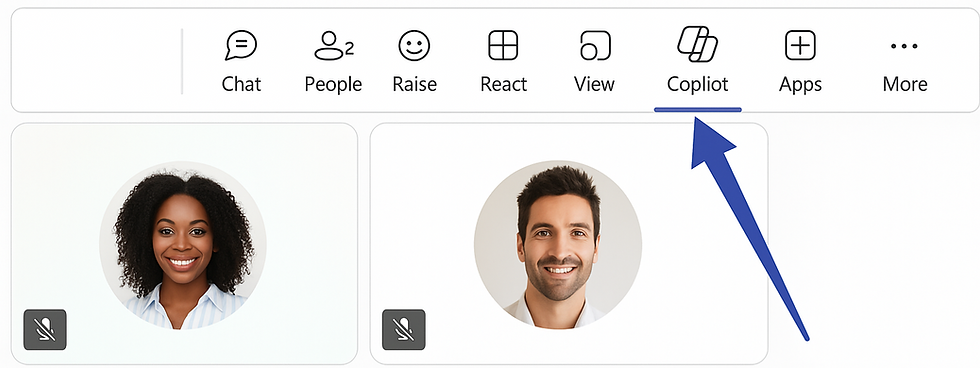
The Copilot Chat pane, found in the left rail of Teams, serves as a federated search and Q&A interface, designed to retrieve and cross-reference information from across Microsoft 365—covering emails, documents, calendar events, SharePoint pages, and more—thereby equipping users with the ability to obtain comprehensive answers across the organization without needing to enter complex search queries or switch between different applications. With the new capability to save and schedule prompts, users can automate the delivery of recurring queries—such as daily dashboards or weekly compliance checks—and have these results delivered at regular intervals, further streamlining information flows and reducing administrative friction.
When focusing on Teams meetings, Copilot’s real-time note-taking and intelligent recap features have fundamentally changed how teams capture, share, and act upon the content of their meetings. As meetings proceed, Copilot is able to generate live notes and highlight emerging action items, presenting these insights in a floating pane that updates as the conversation develops, which means that anyone joining late or switching between calls is immediately brought up to speed. Where meeting recording or transcription is enabled, Copilot leverages speaker recognition (including attribution in BYOD room setups) to assign comments and follow-up items to the correct participants, organizing the discussion into chapters and producing a recap that details every decision, task, and referenced document. After the meeting ends, a detailed Recap tab becomes available in Teams, containing a structured timeline, a list of assigned tasks, and hyperlinks to supporting resources, which ensures that all participants remain aligned on next steps.
The Compose Box Rewrite capability is embedded in every Teams text box, allowing users to draft, revise, and enhance their messages with impressive speed and professionalism, supporting them in tasks like improving tone, condensing complex ideas, or expanding concise replies, so that communications remain both timely and effective. For organizations using Teams Phone—including both internal VoIP and external PSTN calls—Copilot’s reach extends to voice communication, providing transcriptions, identifying sentiment cues, and producing AI-powered summaries that assist teams in roles such as sales and customer support, where the clarity and completeness of follow-up are essential.
Advanced and New Capabilities: Spring 2025 Wave
The pace of Microsoft’s Copilot innovation ensures that users and IT administrators regularly receive meaningful updates, with each monthly release bringing a new layer of utility or security to the Teams experience. The introduction of Instant meeting (“Meet now”) recaps means that even impromptu, unscheduled conversations are now fully summarized by AI, so that teams benefit from thorough documentation and actionable insights without any need for advance planning or calendar management. Saved and recurring prompts within Copilot Chat enable individuals and teams to automate the most frequently requested data pulls—such as project status or compliance updates—so these insights arrive without repeated manual intervention, making operational reporting a far smoother process.
Custom channel-grounded agents give non-technical users a way to create no-code FAQ bots or project assistants that learn only from designated Teams channels, which means information is always relevant and up to date, while also reducing the overhead of IT development cycles. Meanwhile, Safe Links integration scans every hyperlink in a Copilot-generated response at the exact moment a user clicks, delivering real-time protection against phishing and malicious sites, which is increasingly important as AI begins to generate more dynamic content on behalf of employees.
Another recent innovation, the interpreter agent, now in public preview, delivers real-time speech-to-speech translation for meetings, supporting nine languages with voice mimicry to retain the speaker’s original intonation—a capability that enhances global team collaboration and makes multilingual teamwork much more seamless.
Licensing, Administration, and Governance: What Organizations Must Know
For organizations to roll out Copilot in Teams, both an eligible Microsoft 365 base license—such as E3, E5, or Business Standard/Premium—and the Copilot add-on, currently priced at $30 per user per month (or $36 when bundled with Business Basic), must be provisioned. Premium meeting recap features are now included within the Copilot license, so no extra Teams Premium subscription is needed for this aspect. Administrators, using the Teams admin center or PowerShell, retain detailed control over how and where Copilot is enabled, allowing them to create policies for Copilot activation, as well as for the use of transcription and recording—giving meeting organizers the flexibility to determine if Copilot will operate during live sessions, both during and after (for recaps and follow-ups), or not at all for more confidential discussions.
Every stage of Copilot processing is restricted to the customer’s chosen Azure region, which ensures data residency, privacy, and compliance; in addition, no data managed by Copilot is ever used to train public Microsoft AI models, which addresses a primary compliance concern for regulated industries. File-level Data Loss Prevention (DLP) policies are now enforced in Copilot’s prompts and outputs, while the integration with Defender Safe Links means every hyperlink in a Copilot response is scanned before a user can click, providing ongoing protection against cyber threats.
With the deployment of the Copilot Control System dashboard, administrators gain access to advanced analytics on adoption rates, prompt usage, and the lifecycle of custom agents, alongside security and compliance management tools—including Safe Links integration—so that IT and compliance teams can monitor, govern, and refine their organization’s AI-powered collaboration as Copilot adoption expands throughout the business.
___________
FOLLOW US FOR MORE.
DATA STUDIOS


